Master Power BI + SQL – From Data to Insights
Learn Power Bi Course how to manage, query, & analyze data using SQL and visualize it with Power BI dashboards. Beginner-friendly training in Telugu + English with real-world projects, resume prep, and placement support.

100% Live
Training

2 Years
Recordings

Free
Addon Sessions

Real Time
Projects
What is Power BI & SQL Data Analytics?
Data is the most valuable asset in the modern digital economy, but raw data is useless without someone to interpret it. Organizations worldwide rely on Power BI and SQL to transform complex, messy data into beautiful, interactive dashboards that drive massive business decisions.
SQL (The Extractor)
SAP is used globally. This means your skills are valid in India, the US, the UK, and the Middle East, opening doors for massive international consulting roles.
Power BI (The Visualizer)
Developed by Microsoft, Power BI takes that raw data and turns it into interactive charts, graphs, and KPIs. It is the ultimate Business Intelligence tool used by top companies in Finance, Healthcare, Retail, and EdTech.
Learn in Telugu
We break down complex Data Modeling, DAX formulas, and SQL queries into your regional language, making it incredibly easy for beginners and non-IT professionals to master data analytics.
Why Learn Power BI & SQL in 2026?
Data Analytics is one of the fastest-growing and highest-paying sectors in the IT industry. Here is why this specific tech stack is your fastest route to a lucrative tech career
The Ultimate "Low-Code" IT Gateway
If you want a high-paying software job but fear heavy programming (like Java or Python), Data Analytics is for you. Power BI uses a drag-and-drop interface, and SQL relies on simple, logical queries.
Perfect for Commerce & MBA Students
Data analytics is about understanding business. Students from B.Com, BBA, and MBA backgrounds have a massive advantage because they already understand sales, finance, and KPIs.
The AI Advantage
As companies adopt Artificial Intelligence, they need clean data and clear dashboards to track AI performance. Data Analysts are the bridge between AI algorithms and human decision-makers.
Massive Hiring Demand
Every company from small startups to massive MNCs needs to track their performance. They are aggressively hiring professionals who can tell a story with data.
The Analytics Tech Stack You Will Master
We train you on the exact end-to-end data pipeline used by Fortune 500 companies:
SQL Fundamentals
Master database management. Learn SELECT queries, advanced filtering, complex Joins, aggregate functions, and subqueries to pull exactly the data you need.
Power Query
The art of data cleaning. Learn how to import messy data from multiple sources, remove errors, merge tables, and automate your data preparation workflows.
Data Modeling
Connect the dots. Learn how to build relationships between multiple datasets, utilizing star schemas and normalization to optimize your dashboard's performance.
DAX (Data Analysis Expressions)
The secret weapon of top analysts. Master this formula language to create powerful calculated columns, measures, and advanced business KPIs.
Interactive Dashboard Development
Learn visual storytelling. Build highly interactive reports using slicers, filters, maps, and dynamic charts for Sales, HR, and Financial tracking.
Build a Job-Winning Portfolio (Real-Time Projects)
Companies do not hire Data Analysts based on certificates alone; they hire based on your portfolio. You will not just learn theory; you will build real-world dashboards that solve actual business problems.
Projects You Will Build & Showcase:
- Enterprise Sales & Revenue Dashboard
- HR Analytics & Employee Retention Dashboard
- Financial Tracking & Forecasting System
- E-commerce Customer Behavior Analytics
- Retail KPI Reporting Dashboard
You will learn how to import raw data, clean it, write the SQL queries, and present a finished, professional dashboard exactly what hiring managers want to see in a technical interview.
Career Opportunities & Growth
Because Data Analytics focuses on business logic and problem-solving, it is the perfect career path for Freshers, Degree Students, and Career Switchers.
Top Roles You Can Apply For immediately:
- Data Analyst
- Power BI Developer
- Business Intelligence (BI) Developer
- MIS Executive / Reporting Analyst
- Data Visualization Specialist
Where will you work? Skilled analysts are hired across IT firms, massive banking institutions, global e-commerce platforms, SaaS companies, and high-growth startups. Plus, dashboard creation is a highly sought-after skill for remote freelancing!
Salary Opportunities & Industry Standards
Fresher Salaries in India
Job Role
Experience
Average Salary
MIS Analyst
Fresher
₹3 – ₹5 LPA
Reporting Analyst
Fresher
₹3.5 – ₹6 LPA
Power BI Developer
Fresher
₹4 – ₹8 LPA
Data Analyst
Fresher
₹4 – ₹7 LPA
Experienced Professional Salaries
Job Role
Experience
Average Salary
Senior Data Analyst
3–5 Years
₹10 – ₹18 LPA
BI Developer
4–6 Years
₹12 – ₹20 LPA
Analytics Consultant
5–8 Years
₹15 – ₹25 LPA
BI Architect
6–10 Years
₹20 – ₹40 LPA
Remote & Freelance Opportunities
Job Role
Average Salary
Freelance Dashboard Projects
₹25K – ₹3 Lakhs/project
Remote BI Developer
₹10 – ₹25 LPA
International Analytics Projects
₹20 – ₹50 LPA
The Step-by-Step Beginners Roadmap
We guide you from absolute zero to an industry-ready Data Analyst.
Step 1 (Excel Basics)
We start with the fundamentals of data handling, pivot tables, and basic reporting.
Step 2 (SQL Mastery)
You learn how to write logic-driven queries to extract and manage data from massive databases.
Step 3 (Power BI & DAX)
You master data cleaning (Power Query), modeling, and advanced DAX formulas.
Step 4 (Portfolio Building)
You construct real-time business dashboards (Sales, HR, Finance).
Step 5 (Interview Prep)
We provide intensive training on SQL interview questions, DAX scenarios, and how to confidently explain your dashboard logic to recruiters.
Companies Hiring Power BI + SQL Developers


What Makes This Course Different
👉 Module Wise Quizzes, Assignments, and Practice Questions
👉 100% Placement assistance
👉 Industry professionals with 10+ years of experience
👉 Live Chat support assistance
👉 Access to session recordings for 2 years
👉 EMI Option also available with specified cards
👉 Get ₹10,000 Worth of Free Career Booster Add-On Sessions
👉 Dedicated Job Updates
👉 100% Live Training in Telugu
👉 Industry Ready Training
👉 Interview Questions & Study Materials
👉 Resume & Linked In Preparation
Power Bi & SQL Course Syllabus
1: DATA ANALYTICS & BUSINESS FOUNDATIONS
- What is Data Analytics
- Data Lifecycle
- Role of a Data Analyst
- Business Use Case Mapping
- KPI identification
- Analytical Tools Overview
- Business Domains (Retail, Banking,Healthcare, Manufacturing, Telecom)
2: INTRODUCTION TO POWER BI
- Overview of Power BI
- Power BI Architecture
- Licensing (Free, Pro, Premium)
- Power BI ecosystem
3: POWER BI DESKTOP & POWER QUERY
- Data sources and connectivity
- Import vs DirectQuery
- Power Query Editor
- Data transformation
- Query folding
4: DATA MODELLING IN POWER BI
- Star vs Snowflake schema
- Relationships & cardinality
- Cross filtering
- Model optimization
5: DAX
- Calculated Columns vs Measures
- Filter & Row Context
- Core DAX functions
- Time Intelligence
- Performance tuning
6: DATA VISUALIZATION
- Visualization principles
- Custom visuals
- Drill down & tooltips
- Bookmarks & navigation
7: ADVANCED TRANSFORMATION
- Append & Merge queries
- Conditional columns
- Parameters
- M basics
8: PERFORMANCE OPTIMIZATION
- Performance Analyzer
- Efficient DAX
- Best practices
9: POWER BI SERVICE
- Workspaces
- Publishing reports
- Apps
- Data refresh
10: DEPLOYMENT & ENVIRONMENTS
- Deployment pipelines
- Dev/Test/Prod strategy
- Version control
11: SECURITY & GOVERNANCE
- Row-Level Security
- Gateway
- Access control
12: DASHBOARDS
- Dashboards vs Reports
- Creating dashboards
13: INTEGRATIONS
- Power Automate
- Power Apps
- Embedding basics
14: POWER PLATFORM AND AI
- Copilot in Power BI
- Gen AI
- Using ChatGPT for DAX
SQL FOR POWER BI
1: INTRODUCTION TO DATA WARE HOUSE & DATA BASE
- Introduction to relational databases
- Fundamental concepts of Datawarehouse, OLTP and OLAP.
- Several operators (such as logical and relational), constraints, primary andforeign key
2: INTRODUCTION TO SQL
- Installation of SSMS (SQL Server Management Studio)
- What is SQL?
- Overview of SQL (Structured Query Language)
- DDL and DML Commands
- Create Database using Management Studio
- Datatypes in SQL Server
3: DDL AND DML STATEMENTS
- Create, Alter, and Drop Table
- Insert, Update, and Delete Statements
- Truncate Statement
- Basic SQL Syntax
- Queries (SELECT, WHERE)
- Filtering and Sorting Data (ORDER BY, LIMIT)
- Data Selection
- SELECT Statements
- DISTINCT keyword
- Filtering Data
- WHERE Clause (Comparison Operators,Logical Operators)
- BETWEEN, IN, and LIKE operators
- Sorting and Limiting
- ORDER BY, LIMIT, OFFSET
4: AGGREGATE FUNCTIONS
- Count, Sum, Min, Max, Avg, Group By, and
Having Clause - Aggregate Functions
- COUNT(), SUM(), AVG(), MIN(), MAX()
- String Functions
- CONCAT(), SUBSTRING(), REPLACE(),
LENGTH()
5: JOINS
- Introduction to Joins
- INNER JOIN,
- LEFT JOIN,
- RIGHT JOIN,
- FULL JOIN
6: SET OPERATIONS
- Introduction Set Operations
Real Projects You'll Build in This Course
6 Major Projects You Will Work On :
HR Analytics Dashboard – Employee Insights
Provides a complete view of employee metrics like headcount, attrition, diversity, performance, and tenure using SQL datasets.
Executive KPI Dashboard – Management Insights
A high-level dashboard combining KPIs across Sales, Finance, Operations, and HR for real-time monitoring and decision-making.
Customer Deep Dive Development – Business Analytics Domain
Analyzes customer demographics, purchase behavior, churn, and value to help identify segments and improve strategies.
Financial Reporting – Finance Domain
Provides insights into revenue, expenses, profit margins, cash flow, and tracks budget vs actuals and performance trends.
Corporate Spend Analysis
Analyzes planned vs actual IT department costs to understand yearly planning and identify areas with high deviations.
Procurement Analysis
Tracks sales performance, revenue, product trends, and regional insights to support better business decisions.
2 Mini Projects You Will Work On :
Sales Analytics Dashboard Consumer Goods Sector
Tracks sales performance, revenue, product trends, and regional insights to support better business decisions.
Retail Store Performance Dashboard & Sites Overview
Monitors store performance, sales, footfall, and inventory across locations for comparison and better planning.
Watch the Demo of Our Power BI + SQL Course in Telugu to Get a Preview of the Topics Covered.
Hear from Our Successful Students
Complete Power BI + SQL Mastery Course In Telugu
Actual Price
Rs. 49,999/-
Special Price
Rs. 9,999/-
Save
Rs. 40,000/-
- Time : 8:30pm - 9:30pm , 50+ Days Duration
- Start Date: 14th May 2026
- Beginner friendly
- Hands-on-Projects
- Telugu Explanation
- Live Support
Get ₹10,000 Worth of Free Career Booster Add-On Sessions
Resume Building
Create strong resumes with expert guidance.
Job Updates
Get access to latest openings & hiring alerts.
Interview Prep
Mock interviews and communication training.
LinkedIn Boost
Optimize your LinkedIn for visibility.
Freelancing
Learn how to start and grow as a freelancer.
Career Advancement Results
At Frontlines Edutech, we believe in transforming careers through high-quality, industry-relevant education. Our focus is on providing practical skills and knowledge that lead to real-world success. With a proven track record of impactful learning, we ensure our students are well-equipped to excel in their chosen fields and achieve their career goals with confidence.
Frequently Asked Questions
Q: Do I need to be a coding expert or strong at math to learn Data Analytics?
Not at all. Power BI is a “low-code” tool that uses a simple drag-and-drop interface, and SQL relies on straightforward, logical commands. You do not need to know complex programming languages like Java or Python. If you have basic logic and problem-solving skills, you can master this.
Q: I am from a B.Com, BBA, or MBA background. Is this the right career for me?
Yes! In fact, commerce and management students often make the best Data Analysts. Data Analytics is all about understanding business performance, sales, and finance. Your business background gives you a massive advantage over purely technical candidates.
Q: Are the live training classes conducted in Telugu?
Yes! All live sessions, practical implementations, and doubt-clearing classes are taught in Telugu. We explain complex concepts like Data Modeling and DAX formulas in your regional language to ensure absolute conceptual clarity.
Q: What specific tools and technologies will I master?
You will master the complete modern analytics stack: Advanced Excel (for basics), SQL (for database extraction), Power Query (for data cleaning), DAX (for complex calculations), and Power BI (for interactive dashboard design)..
Q: Will AI tools like ChatGPT replace Data Analysts?
No. AI is actually creating more jobs for Data Analysts. AI engines need massive amounts of clean data to function, and business leaders need humans to interpret what the AI is outputting. Data Analysts are the crucial bridge between raw AI data and human decision-making.
Q: Will I build a portfolio, or is this just theory?
This course is entirely project-driven. You will not just learn theory; you will build a professional portfolio containing real-time dashboards (like Enterprise Sales Tracking, HR Analytics, and Financial Forecasting) to show directly to hiring managers.
Q: What is the starting salary for a Data Analyst or Power BI Developer in India?
Freshers can expect starting salaries between ₹4 LPA and ₹8 LPA depending on their portfolio and SQL skills. As you gain experience, Senior Data Analysts and BI Architects easily scale to ₹15 LPA – ₹25 LPA+.
Q: Is Data Analytics a good career for remote work and freelancing?
Yes, it is one of the most remote-friendly careers globally. Every business needs dashboards, but they don’t always need a full-time employee. Many of our alumni take on highly lucrative freelance projects building Power BI dashboards for international clients.
Q: Do you provide placement assistance?
Yes. We provide comprehensive placement support. This includes aggressive portfolio reviews, building an analytics-focused resume, conducting SQL & DAX mock interviews, and providing direct job updates for top tech and product companies.
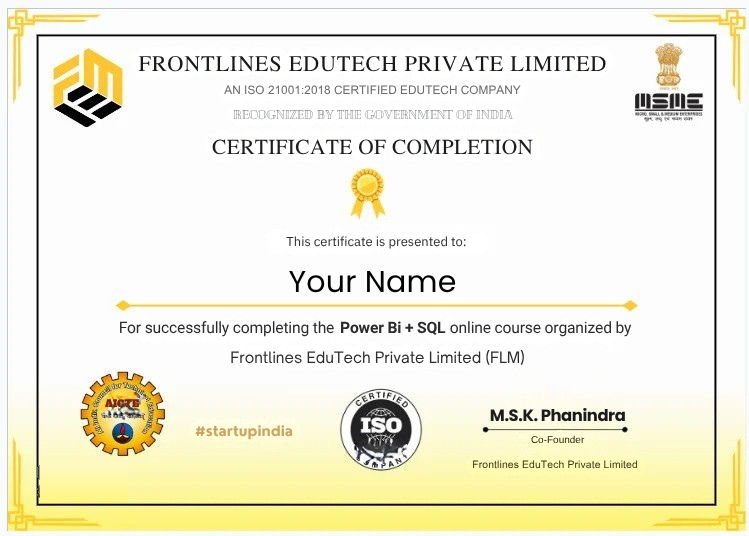
Q: Will I receive a certificate after completing the Power BI & SQL course?
Yes. Upon successfully completing the training and your real-time dashboard projects, you will receive an industry-recognized certificate from Frontlines EduTech to boost your LinkedIn profile and resume credibility.
Get Certified
Yes, you’ll get a Certificate representing your Industry Readiness once you submit your projects and clear the pre placement test.

Approved by AICTE

Certified by ISO 21001:2018

Recognized by Startup India

Registered under MSME